
Kuli Kuli: Travel Translator
Mediocre CompanyTravel & Local
4.115.00 Reviews
- Version
- 2.0.0
- Installs
- 500.00K
- Age Rating
- Everyone
Screenshots




Our Review of Kuli Kuli: Travel Translator
 Analysis by Appyee
Travel translation is one of those jobs where a small misunderstanding can quickly become inconvenient: the wrong bus stop, an unclear food order, or a request for help that comes out differently than intended. Kuli Kuli - Travel Translator is aimed at those moments, offering translation across more than 120 languages. I see its strongest potential in quick, everyday exchanges, where a phone can help bridge a gap but still leaves you responsible for checking that the meaning is right.
It is a free travel and local app from Mediocre Company, with optional in-app purchases priced from $4.99 to $29.99 per item. That makes the first decision fairly simple: you can try the app without paying, while any paid value depends on what an individual purchase provides for the way you plan to use it. I would not treat the existence of purchases as proof that a paid option is necessary; I would first see whether the free access covers my actual travel needs.
What the free starting point means
The app is rated for Everyone, has an average rating of 3.3 from 313 ratings, and has passed 100K+ installs. Those figures are useful context, not a promise that it will work equally well for every language pair or conversation. I would take the middling average as a reason to test it before depending on it, especially if a trip involves important appointments or complicated arrangements.
Its current version is 1.3.5, and it runs on Android 5.0 and later. The app was released on Sep 23, 2024. These details help set expectations about compatibility, but they do not tell me how well a particular translation will handle slang, regional expressions, or noisy surroundings. For travel, that distinction matters: broad language coverage is valuable, while accuracy in the specific situation is what makes a translation useful.
There are 6 reviews alongside the ratings, so I would avoid reading the average as a detailed consensus about every feature. In practical terms, I would install it before leaving home, choose a language pair I expect to need, and try a few ordinary phrases. That quick check is more informative for my trip than assuming a high number of supported languages guarantees a good result for the one I need.
Where it can help—and where I would be careful
Translation apps are most valuable when they reduce friction, not when they pretend to remove every language barrier. For me, this one makes sense as a companion for short exchanges: confirming a direction, asking whether a shop is open, or explaining a simple preference. I would still keep important details written down in a form I can show, rather than trusting one spoken translation to carry a complicated message perfectly.
Everyday exchanges are the best test
Imagine arriving in a town where you do not speak the local language and needing to ask a café worker whether a dish contains an ingredient you avoid. A translation app can help you form the question, but I would keep it short and specific, then use the reply as a starting point for clarification. If the answer affects an allergy or another health concern, I would not rely on an automated translation alone; a prewritten, carefully checked note or help from a fluent speaker is the safer choice.
The same approach works for directions. Rather than entering a long explanation about where I need to go, I would ask one clear question, check that the place name is preserved, and compare the reply with a map or a sign. This is a small workflow adjustment, but it reduces the chance that an unclear sentence sends me in the wrong direction. A translation is a communication aid, not a substitute for checking the route.
For quick spoken exchanges, the original review describes a voice option and an interface intended to make common tasks accessible. I would use voice when typing is awkward, such as while standing at a counter, but move to text when a name, address, number, or spelling needs to be exact. Speech recognition can be affected by accents and background sound, so repeating a short phrase slowly or switching to typed wording is a sensible fallback rather than a sign that the app has failed.
Choosing between voice, typing, and a phrasebook
Each method suits a different kind of conversation. Voice is convenient when both people can take turns and the exchange is simple. Typing gives me more control over wording and is easier to review before showing it to someone. A phrasebook is useful for predictable needs, because a prepared phrase can save time and avoid repeatedly composing the same request. I would not expect any one method to be best in every setting; switching approaches is often the practical answer.
A non-obvious tip is to keep each translation focused on one request. If I combine a greeting, an explanation, two questions, and a condition into one long sentence, a small error can make the whole message hard to interpret. Breaking it into short turns gives the other person a chance to respond and lets me spot a misunderstanding earlier. This is especially useful at a ticket counter or reception desk, where a single number or location can change the outcome.
Another useful habit is to confirm the part that matters most. If I ask for a platform, room, price, or time, I can repeat that key detail back or show the translated text so the other person can correct it. That may feel slower than trusting a fluent-sounding result, but it is a worthwhile trade-off when the consequence of getting it wrong is more than a minor inconvenience.
Offline planning and practical limits
The original review notes an offline mode with downloadable language packs. If I plan to use offline translation, I would prepare before travelling rather than wait until I have no signal. I would also test the chosen language pair while still connected, then check what remains available after disconnecting. That simple rehearsal can reveal whether the tool fits the journey before I need it in a stressful moment.
Offline access is particularly relevant on a long train ride, a rural day trip, or any route where data service may be unreliable. It can also help avoid depending on public Wi-Fi for every short question. Still, offline translation is not the same as having a human interpreter, and it is sensible to carry essential information in another form too: a written destination, booking details, or a key phrase checked in advance.
There is a trade-off between convenience and confidence. A translator can make an unfamiliar place feel more manageable, yet a smooth-looking sentence may conceal an awkward or incomplete meaning. I would be cautious with jokes, idioms, legal wording, medical instructions, financial decisions, and anything that needs precise consent. In those cases, a bilingual person, an official translation, or a direct written explanation is a better fit.
How it compares with familiar alternatives
Compared with a general-purpose translation app, this app’s travel focus and phrasebook-oriented approach may be more convenient for routine visitor questions. A broad translator may be preferable if I already rely on it for documents or other daily tasks, since keeping familiar tools together can be simpler. I would compare them by testing the same short phrases in the language pair I actually need, not by assuming that a larger language list automatically means better results.
A printed phrase card or saved note is less flexible, but it does not depend on opening an app in the moment and can be useful when battery or connectivity is a concern. A human interpreter is far better for nuanced or consequential conversations, though it is not always available for a quick café question. I see this app between those options: more adaptable than a fixed card, more convenient than arranging help for every minor exchange, and less dependable than a fluent person for high-stakes meaning.
Because there are optional purchases, I would check the in-app purchase details before paying and ask myself what problem the purchase solves. The free starting point is enough to evaluate whether the interface and language support suit my habits. If I only need occasional help with basic questions, paying may not add value for me; if a paid item clearly supports a repeated need, I can judge that on its own terms rather than assuming every traveller needs it.
Who is likely to get the most from it
I would recommend trying it if you take occasional trips, want help with everyday conversations, and are comfortable checking important translations rather than treating them as unquestionable. It may also suit someone who prefers tapping a prepared phrase over composing the same request repeatedly. The wide language selection is appealing for travellers whose plans cross language boundaries, but I would test the particular languages before building a trip around it.
I would skip it as a primary solution if your work or travel depends on exact interpretation, if you need polished translation of long documents, or if you cannot tolerate uncertainty in a critical exchange. It is also not a replacement for learning basic courtesy phrases: a greeting and a patient, clear question can make an interaction warmer, while the app handles only part of the communication. For specialist translation, a dedicated human service is the more responsible choice.
My buying advice is to begin with the free access, verify the language pair and offline preparation you need, and only consider an in-app purchase when its purpose is clear to you. That keeps the decision grounded in actual use rather than the appeal of a long language list. The app is free to start, but whether a paid item is worthwhile depends on its specific contents and your travel routine.
My practical verdict
Kuli Kuli - Travel Translator is worth a cautious try as a travel companion for simple, short exchanges, particularly if you value having typed, spoken, and prepared-phrase approaches available. I would install it ahead of a trip, test it in a calm setting, and keep a backup for destinations, bookings, and sensitive information. Its usefulness comes from making ordinary interactions easier, not from guaranteeing perfect interpretation.
The rating of 3.3 is a reminder to approach it with realistic expectations, while the free entry point makes a personal trial a low-commitment way to decide whether it fits. I would choose it for asking a basic question or navigating a routine interaction; I would choose a human or carefully checked alternative for anything where a translation mistake could have serious consequences. Used with that distinction in mind, it can be a helpful tool rather than something I have to trust blindly.
If you are planning a trip, my simplest recommendation is to test the phrases you expect to use, practise switching between voice and text, and prepare offline before you leave reliable coverage. That makes it easier to know when the app is enough and when you should use another route. For casual travel help, that balance is more valuable than expecting any phone translator to speak for you perfectly.
When I first opened Kuli Kuli, I was greeted with a clean, intuitive interface. It's easy on the eyes, which is something I always appreciate in an app I'm going to be using regularly. The design is straightforward, with everything labeled clearly, so even if you're technologically challenged, navigating the app is a breeze.
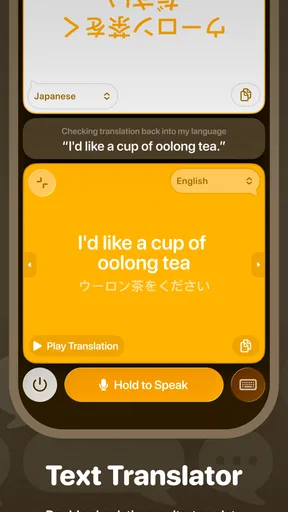
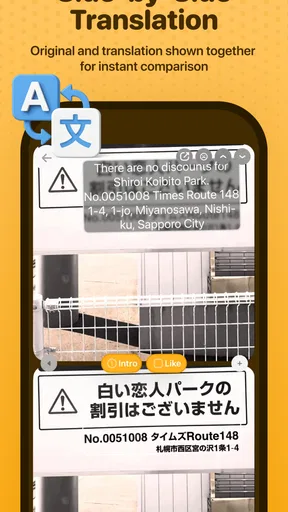
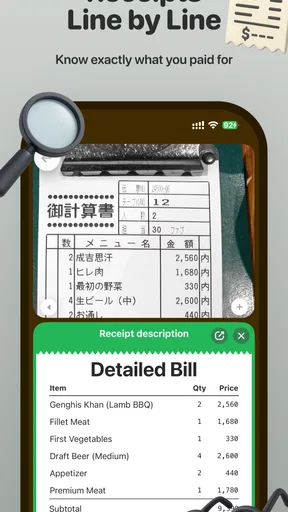
The app supports a wide range of languages, from common ones like Spanish and French to more exotic tongues like Swahili and Thai. You can either type in the text you want translated or use the voice feature, which is a godsend when you're on the move. Just hold your phone up, let the app work its magic, and voilà, your translation appears in real-time!
Real-Time Voice Translation
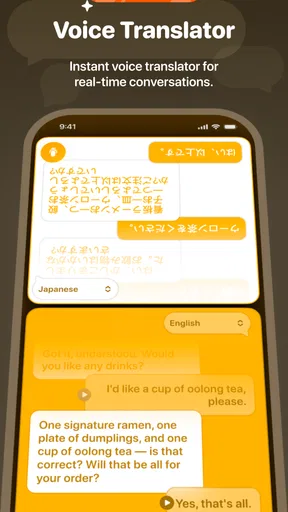
One of the standout features that I found incredibly useful is the real-time voice translation. Whether you're trying to ask for directions or order food, speaking directly into the app and getting an immediate translation is a game-changer. It's like having a personal translator right in your pocket.
The voice recognition is pretty spot-on, and even when I mumbled or had a bit of background noise, it managed to get the translation right most of the time. It’s impressive how Kuli Kuli handles different accents and dialects without breaking a sweat.
Offline Mode
Another feature worth mentioning is the offline mode. We all know that Wi-Fi can be a luxury when traveling, especially in remote areas. With the app, you can download language packs and use it without needing an internet connection. This is particularly handy when you're on a tight data plan or trekking through the mountains with no signal.
Usability and Accessibility
The app is designed with the user in mind. Once you select the languages you need, switching between them is seamless. The developers have also included a handy phrasebook feature for common phrases, which I found to be a lifesaver during my travels. Instead of typing sentences over and over, I could just tap on a phrase and get on with my day.
Accessibility is another strong point. The app supports a variety of fonts and text sizes, ensuring it caters to all users. Whether you're young or old, tech-savvy or not, Kuli Kuli ensures that everyone can use it comfortably.
Using the app has truly made my travels more enjoyable and stress-free. It’s not just the translations that are top-notch, but the overall user experience that makes it a must-have for any traveler. The app is reliable, fast, and doesn’t drain your phone’s battery, which is always a plus when you’re out exploring all day.
In the end, whether you're a frequent traveler or just planning a one-time adventure, the app is worth considering. It’s like having a linguistic Swiss Army knife at your disposal. So next time you find yourself lost in translation, let Kuli Kuli be your guide.
Verdict
Strengths of Kuli Kuli: Travel Translator
- Wide language support for global travelers.
- Offline mode available for no data usage.
- Easy-to-use interface for quick translations.
- Voice input makes it hands-free.
- Frequent updates with new features.
Limitations of Kuli Kuli: Travel Translator
- Limited advanced grammar translations.
- Pronunciation can be inconsistent.
- Some languages lack full phrases.
- Requires space for offline downloads.
- Occasional app crashes reported.
Similar Picks in This Category
View All
Google Maps
Google LLC3.4

Google Maps Go
Google LLC4.1

Booking.com: Hotels & Travel
Booking.com Hotels & Vacation Rentals4.8

Google Earth
Google LLC3.8

Skyscanner Flights Hotels Cars
Skyscanner Ltd4.8

trivago: Compare hotel prices
trivago N.V.4.4
Frequently Asked Questions
What platforms is Kuli Kuli - Travel Translator available on?
Kuli Kuli - Travel Translator is available for download on both Android and iOS platforms. Users can easily find it on the Google Play Store for Android devices and the Apple App Store for iOS devices. Make sure your device meets the necessary system requirements for the best experience.
Does Kuli Kuli - Travel Translator work offline?
Yes, Kuli Kuli - Travel Translator offers offline functionality. You can download language packs for use without an internet connection, which is particularly useful when traveling in areas with limited connectivity. However, some features may require an internet connection to function fully.
How many languages does Kuli Kuli - Travel Translator support?
Kuli Kuli - Travel Translator supports over 50 languages, making it a versatile tool for travelers. It covers major languages such as Spanish, French, German, Mandarin, and many more. Regular updates may add support for additional languages, enhancing its usability.
Is Kuli Kuli - Travel Translator free to use?
Kuli Kuli - Travel Translator is free to download and use, but it offers in-app purchases for premium features. These may include additional language packs, advanced translation options, or an ad-free experience. Users can choose to upgrade based on their needs and preferences.
How accurate is Kuli Kuli - Travel Translator?
The app uses advanced machine learning algorithms to provide accurate translations. While it performs well with everyday phrases and common expressions, users should be aware that complex or nuanced text might not always translate perfectly. Continuous updates aim to improve the accuracy and reliability of translations.
